FreshLimePay Cloud API Keys Are Here!
🚀 Exciting News for Developers: API Keys Are Here!
FreshLimePay Cloud now supports API keys for Checkout Payment Buttons! 💳
This means you can now programmatically create, update, and delete buttons for PayPal and Stripe without ever leaving your code editor. Automation, workflows, or integrations? ✅ All possible now.
🔑 Why API Keys Matter
Before, you had to manually create buttons through the Cloud dashboard. That works, but it’s not scalable.
With API keys:
- ✅ Programmatic access for automation
- 🔒 Secure API authorization
- 🖥️ Manage buttons without logging into the dashboard
- 🔗 Integrate FreshLimePay into your apps or backend services
⚙️ How It Works (High Level)
The workflow is simple:
- Generate an API key in your FreshLimePay Cloud account
- Include the key in the
X-API-KEYheader for all requests - Call the Checkout Payment Button endpoints (create, update, delete)
- Buttons appear instantly in your account, ready to accept payments 💵
📝 Example: Creating a Checkout Payment Button
Here’s how to create a new button for PayPal or Stripe:
POST /product-payment/create HTTP/1.1
Host: cloud-api.freshlimepay.com
Content-Type: application/json
X-API-KEY: your-api-key-here

{
  "productName": "FreshLime T-Shirt",
  "amount": "29.99",
  "currency": "USD",
  "paymentMethod": "Stripe",
  "paymentType": "one_time",
  "isLive": true,
  "description": "Limited edition FreshLime T-Shirt",
  "billingInterval": null
}
Response
{
  "isSuccess": true,
  "data": "btn_123456789",
  "message": "Checkout Payment Button created successfully"
}
🔍 What’s happening here
productName– Name of your productamount– Payment amount as a decimal stringcurrency– e.g., USD, EURpaymentMethod–PayPalorStripepaymentType–one_timeorsubscriptionisLive–truefor live payments,falsefor sandboxdescription– Optional product descriptionbillingInterval– Required only for subscriptions
With this, your button is ready to embed in your site or app instantly. ⚡
🛒 Easy Dynamic Checkout Buttons for eCommerce Websites
It’s now very easy to create dynamic checkout buttons for your eCommerce websites. 🌐
- Add buttons programmatically for every product
- Customize pricing, currency, and payment methods on the fly
- Embed instantly in product pages, carts, or popups
- Support subscriptions or one-time payments dynamically
This means your online store can generate buttons automatically based on inventory or user selections, reducing manual effort and improving user experience. 🎯
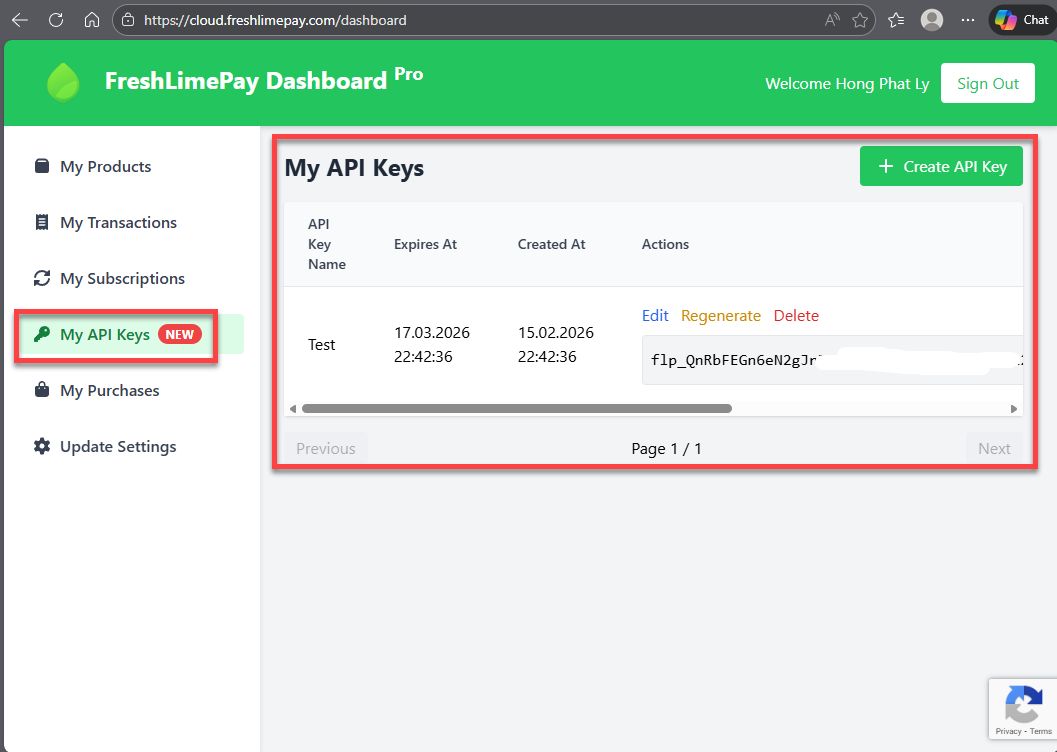
🗝️ Generate & Manage API Keys in FreshLimePay Cloud Dashboard
Users and developers can easily generate and manage API keys directly inside the FreshLimePay Cloud dashboard. ☁️
Just navigate to:
Account Settings → API Keys
From there you can:
- ➕ Generate new API keys
- 🔁 Rotate existing keys for security
- ❌ Revoke unused or compromised keys
- 👀 View all active API keys in one place
This gives you full control over access and security while building integrations. 🔐
📸 Example: API Keys Available in Dashboard
🌟 Why This Matters
API keys give you control, automation, and flexibility:
- 📊 Manage buttons at scale
- 🔗 Integrate directly with your SaaS or backend
- ⏱️ Avoid manual dashboard clicks
- 🔄 Build repeatable workflows for multiple products
Whether you’re a developer, agency, or indie maker, this is a huge time-saver.
🏁 Getting Started
- Log in to FreshLimePay Cloud
- Go to API Keys in account settings
- Generate your key
- Start creating Checkout Payment Buttons programmatically!
Full API reference and OpenAPI spec are available here: FreshLimePay Cloud API Docs
💡 Final Thoughts
This update isn’t about replacing the dashboard—it’s about making your life easier. API keys let you automate, scale, and integrate FreshLimePay Cloud into your workflow while keeping payments secure and simple. 🔐
Try it today and see how much time you save!⏳
- 🌐 Website: https://freshlimepay.com
- ☁️ Cloud & API: https://cloud.freshlimepay.com